
Create your signature
Draw, type, or upload a signature or initials, or use one you have already saved.
3 min readUpdated
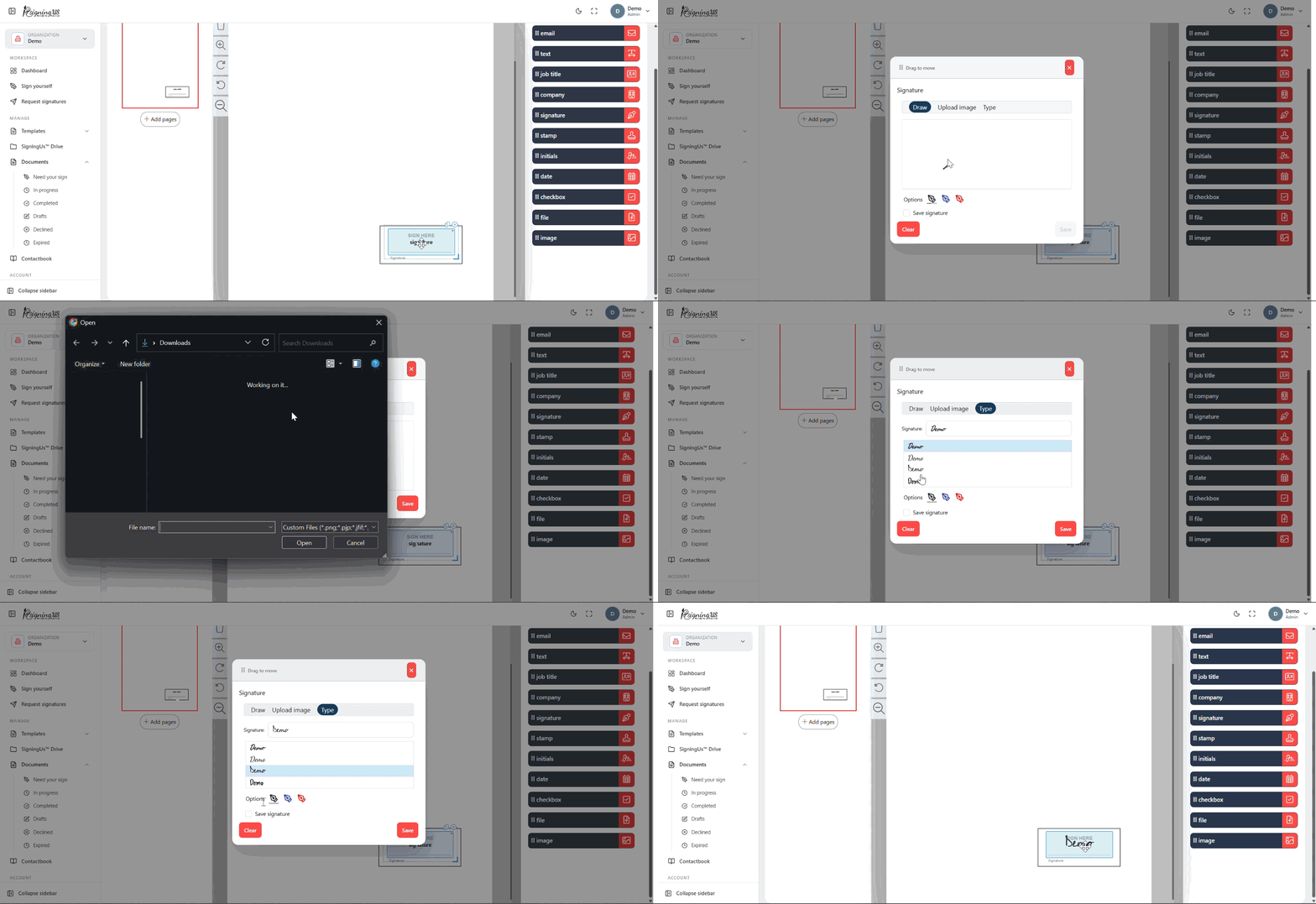
Select a Signature or Initials field on the document. A window opens with up to four signing options. The options you see depend on the methods allowed by the sender.
| Tab | How it works |
|---|---|
| Draw | Sign using your mouse, trackpad, or finger. Choose black, blue, or red ink. Select "Clear" to start again. |
| Type | Enter your name and choose a style: Fasthand, Dancing Script, Cedarville Cursive, or Delicious Handrawn. |
| Upload image | Upload an image of your handwritten signature in PNG, JPEG, WEBP, GIF, BMP, or AVIF format. Turn on "Remove Background" to remove a white or paper background. |
| My signature / My initials | Use the signature or initials you have saved in your SigningUS account, if you have one. |
Select "Save" to place the signature in the field.
Sign Every Field at Once#
If the document contains multiple Signature or Initials fields assigned to you, select "Auto sign all" before saving. SigningUS fills all of them with the same signature, so you do not have to sign each field individually.
Still stuck? Email support@signingus.com and tell us which page you were on and what you expected to happen.