
The Billing page
Who can access Billing and what the current plan card tells you.
3 min readUpdated
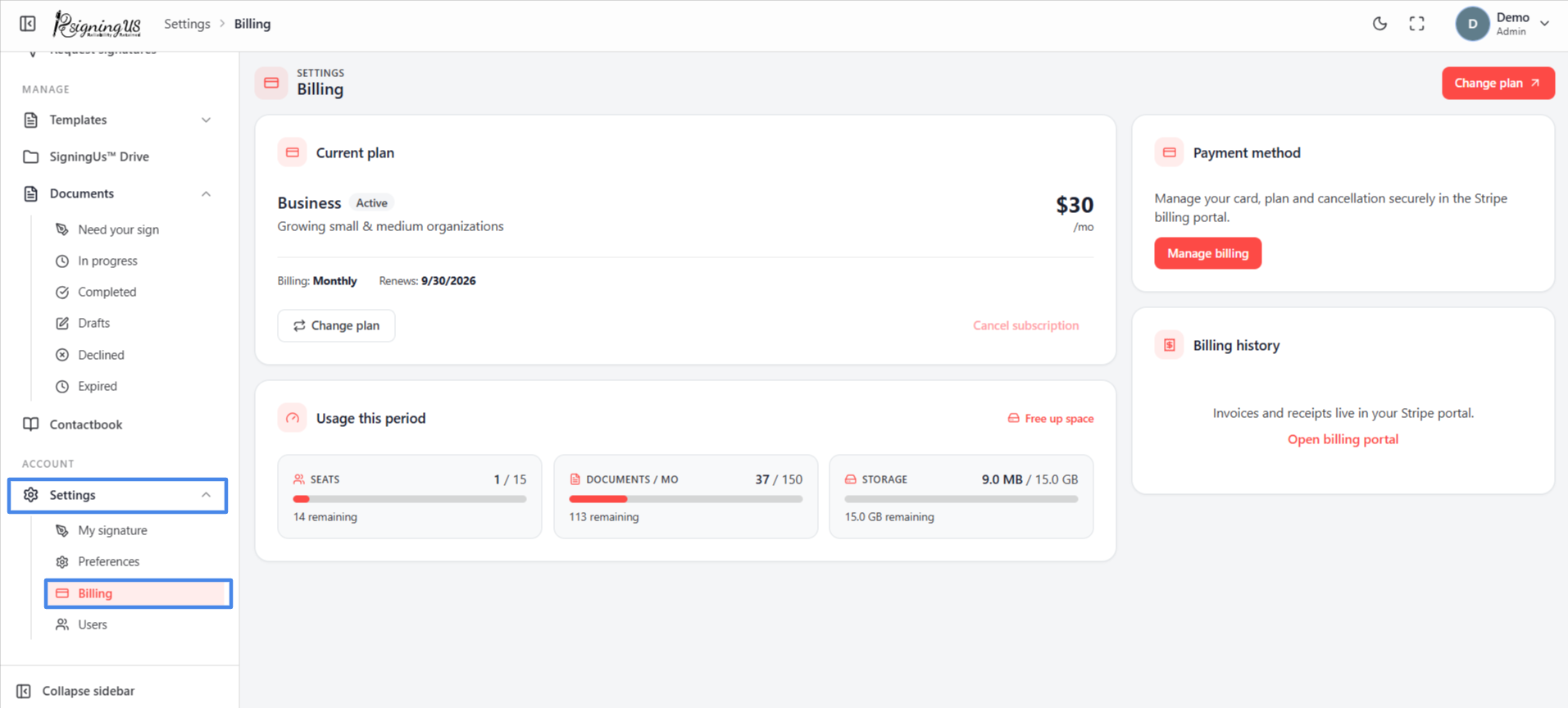
Admins and OrgAdmins can open Billing from Settings → "Billing" in the sidebar. Anyone can also access it from "Manage" or "Upgrade" on the usage card at the top of the dashboard.
Current Plan#
The "Current plan" card shows your plan's name and price, whether you are billed monthly or annually, a status label, and one key date.
| Status | Meaning |
|---|---|
| Active | The plan is running normally. |
| Trial not yet charged | You are in a trial of a paid plan. A banner shows when the trial ends and when your card will first be charged. |
| Cancels soon | You cancelled the plan, but it remains active until the end of the period you paid for. |
| Inactive | The plan has ended or a payment has failed. New work is paused until the issue is resolved. |
| Date label | Meaning |
|---|---|
| Renews | When the next payment is taken. |
| First charge | When a trial ends and you are first billed. |
| Access until | The last day of a plan that is scheduled to cancel. |
| Allowance resets | When your monthly document allowance starts again. |
Buttons on the Card#
- "Change plan": Opens the plans page.
- "Cancel subscription": Schedules cancellation at the end of the current billing period. See "Cancel or Resume Your Subscription".
- "Resume subscription": Appears instead of "Cancel subscription" once a cancellation has been scheduled.
Still stuck? Email support@signingus.com and tell us which page you were on and what you expected to happen.