
Advanced options
Signing order, time to complete, Cc and Bcc, the signer tour, signature notifications, and a redirect link.
4 min readUpdated
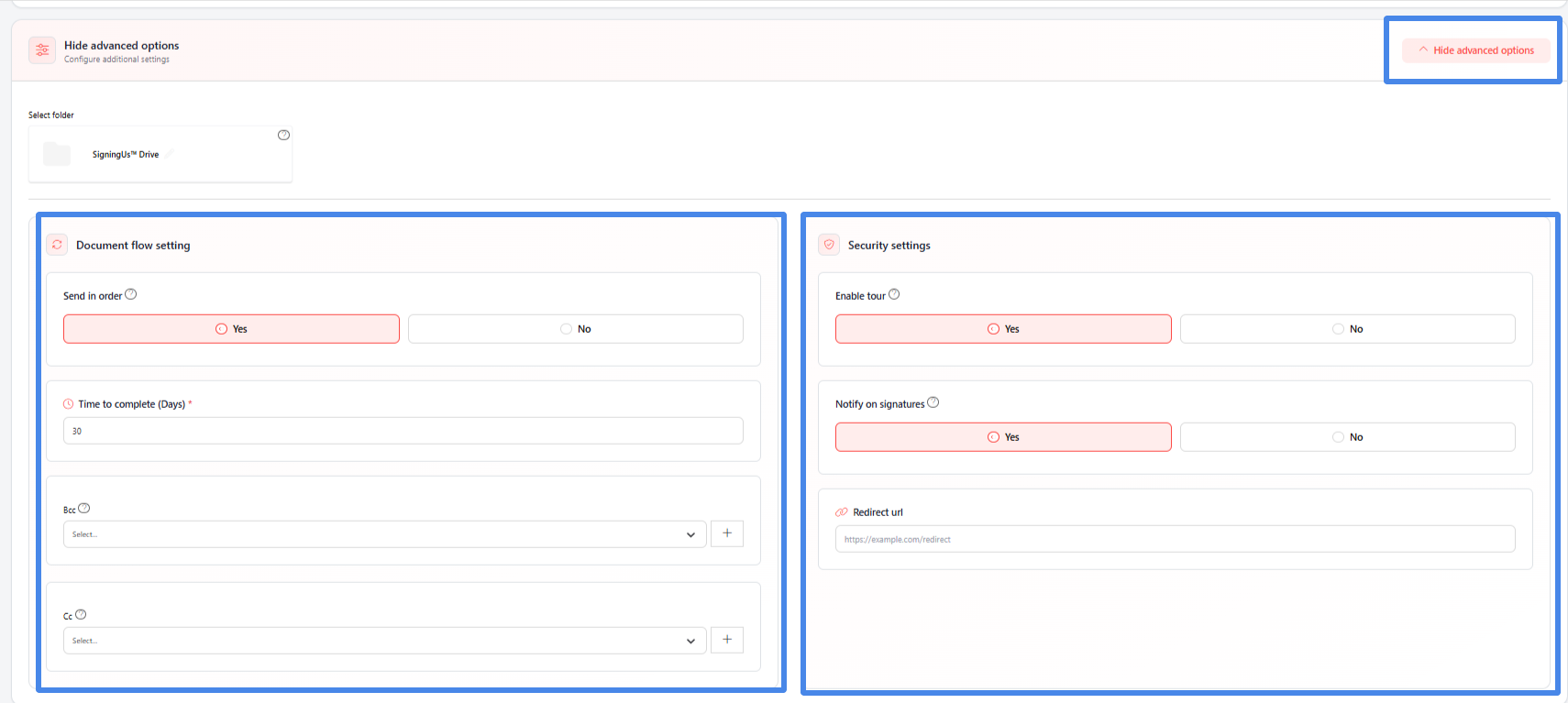
Select "Advanced options" on the request form to display two groups of settings. Their default values come from your organization's Preferences.
Document Flow Settings#
| Setting | What it does |
|---|---|
| Send in order | Yes: Only the first signer receives an email. Each subsequent signer is emailed after the previous signer has signed. No: All signers are emailed at the same time and can sign in any order. |
| Time to complete (Days) | The number of days signers have to complete the document before it expires. The default is 30 days. |
| Bcc | Contacts who receive the completed document by email without being visible to the other recipients. |
| Cc | Contacts who receive a copy of the completed document by email. |
Security Settings#
| Setting | What it does |
|---|---|
| Enable tour | Yes: Shows signers a short guided tour while they sign. No: Skips the tour, which can be faster for people who frequently sign documents with SigningUS. |
| Notify on signatures | Yes: Sends you an email each time a signer completes their signature. Regardless of this setting, everyone receives a completion email with the signed document and completion certificate attached. |
| Redirect URL | Optional. A web address where signers are sent after they finish signing, such as your own thank you page. The URL must be valid. |
Still stuck? Email support@signingus.com and tell us which page you were on and what you expected to happen.